Ben Sims (@BenSimsTech) profile picture

Programmer: Graphics, C++, C#, Shaders, Render Pipelines, Performance, Unity, Unreal, PC, Console, cats. https://www.teapawt.net/t.co/ZVhM7nzRvf https://www.teapawt.net/t.co/L6p2GNXesk

Adelaide, South Australia
Joined June 2016
Photo by Ben Sims (@BenSimsTech)Photo by Ben Sims (@BenSimsTech)Photo by Ben Sims (@BenSimsTech)Photo by Ben Sims (@BenSimsTech)Photo by Ben Sims (@BenSimsTech)Photo by Ben Sims (@BenSimsTech)Photo by Ben Sims (@BenSimsTech)Photo by Ben Sims (@BenSimsTech)Photo by Ben Sims (@BenSimsTech)Photo by Ben Sims (@BenSimsTech)
Decided to try implementing camera-roll when strafing without relying on broken physics. It works reasonably well, using the same quaternion spring damping as my weapon-recoil camera shake. This is more camera shake than you'd want for a casual FPS, but might suit a tactical one.
Turns out if you accidentally break some player rigidbody interpolation logic, your game ends up feeling like the game Bodycam. Maybe this was their trick all along. The accidental lean is cool tho. Windows having bad HDR capture making the game look super overexposed also helps
12
1,705
Turns out if you accidentally break some player rigidbody interpolation logic, your game ends up feeling like the game Bodycam. Maybe this was their trick all along. The accidental lean is cool tho. Windows having bad HDR capture making the game look super overexposed also helps
1
1
7
2,744
(Here is the less broken version for completion. Trying to find a nice balance between root-motion/animation-driven camera/player movement, procedural effects, and control. Making it framerate+physics framerate independent is a fun challenge, this is for multiplayer+perf reasons)
1
2
678
I often see "Use a PID controller" in response to "How do I achieve a given rotation using physics/torque?" If you know how the physics engine updates rotation, you can derive an exact torque. This is the code for Unity/PhysX, and an example rotating in a single frame.
1
10
925
The video is running with a very slow fixed timestep of 200ms to show that the technique is stable even for large delta time values. It also compensates for drag. PID controllers don't make sense when you know the actual calculations involved. Stop using them.
3
520
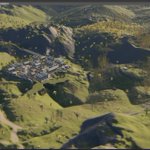
Just some mildly moody screenshots from the thing that I'm trying to make into a thing. Also pictured: rewritten gpu driven foliage, terrain and grass renderers. Writing a device radix sort was fun-ish. Currently reworking the terrain shader, needs better height blending.
3
2
46
2,259
A few other interesting highlights, uses my improved GTAO with the fix for the darkening issue, reworked screen space GI which helps significantly for foliage, especially after darkening introduced by GTAO. Finally, is also using the GT7 HDR tonemapper from a recent presentation.
5
772
I've been seeing some 'branchless code' posts making the rounds again. The posts are aimed at CPU, but the same approach seems to be common for shaders too. Replacing conditionals with math is generally always going to be bad. If it helps, your code is probably compiling badly.
Hey, don't "optimize" conditional moves with mix()+step(). Please stop advising that. Why: iquilezles.org/articles/gpuc…
13
11
1
222
16,466
This always results from the same thing: people not actually profiling and checking the assembly of their code before 'optimising' it. Please actually make sure your code is compiling the way you think it is, and make sure the thing you think is 'slow' is actually a problem first
2
1
33
1,128
Every time I implement volumetric lighting (Using froxels) I end up having a huge performance hit from the final raymarch/integration stage. At 1440p and 8x8 tiles I'm seeing nearly 5ms on an RTX 3070 yet the technique was used as early as Assasins Creed 4. What am I missing here
6
2
70
9,455
Granted I'm doing a little bit more work than usual since I'm combining atmospheric extinction with the luminance+extinction of the volume, but if anything, the extra ALU should be hidden by the latency of texture reads anyway. Maybe parallel sum is the way to go?
3
9
1,434
Experiments with micro-shadowed terrain based on precomputed GTAO+bent normals, approximating sun as a disk light. Needs an artifically large sun diameter for smooth results, but works reasonably well otherwise. Technique should work equally well for local lights too.
1
11
84
5,685
Results without any shadow mapping. The technique can add plausible shadowing outside of the max shadowmap range. Nice for reducing light leaking, and most of the work is done in the precomputation stage.
1
1
6
1,163
Anyone know how to calculate area lighting from a distant light source (eg the sun) treating it as a disc with an angular diameter? All the area light resources I can find deal with a distance and radius, but since the numbers are huge for the sun, angular diameter should be fine
2
12
1,565
I've looked at the equations from Moving Frostbite to PBR and LTC cosine papers and closest representative point for specualr lighting, but all I'm interested in is the diffuse term from a disc with a constant angular diameter. My math isn't quite good enough to derive it myself.
1
1
687
Saw a cool light show tonight for the Illuminate festival at Adelaide's Botanic Gardens, but how do they make irl volumetrics without any ghosting? I guess this wasn't using Unreal. Some pretty fancy area lights too. Guess I need to up my shader game.
How are games handling volumetric lighting for moving sources? The froxel approach seems like the most common technique but relies on temporal so you get bad ghosting with moving lights. Anisotropic fog also causes aliasing as camera moves. Neighbor clamp seems expensive for 3D.
1
15
1,594
How are games handling volumetric lighting for moving sources? The froxel approach seems like the most common technique but relies on temporal so you get bad ghosting with moving lights. Anisotropic fog also causes aliasing as camera moves. Neighbor clamp seems expensive for 3D.
10
1
1
40
6,451
Also lights that quickly switch on/off, eg a muzzle flash from a gun leave a fading trail. Is using a combination of approaches better? Eg using cone/sphere meshes to render point/spot volumetrics instead of froxels? Wouldn't work as well with transparent effects though, eg smoke
2
3
855
Am I missing something or is detail texturing impossible in substance painter? Eg a unique UV0 set textured the usual, plus a tiled UV1 set containing repeated fine details combined with the base texture? None of substance's shaders support it and there are no detail channels and
2
2
893
there doesn't appear to be a way to pick a UV set per channel. Is there another way to make detail textures that I am missing? Or is it a technique the industry has given up on in favor of having multiple 8k textures/virtual texturing or something instead?
1
448
Making games is hard because sometimes you just want to take screenshots of your sky/clouds all day.
3
1
24
1,652
How to PBR: n1(air ior): ~1 n2(dielectric ior): 1.5 f0(specCol) = ((n1-n2)/(n1+n2))^2 == 0.04 f0 = lerp(f0, albedo, metallic) fresnel = lerp(f0, 1, pow(1-LdotH, 5)) spec = GgxDv(roughness)*f0 diffuse = lerp(albedo, 0, metallic) return (specular + diffuse)/Pi * NdotL * lightColor
3
6
88
6,005
Ior = index of refraction. GgxDv = GgxD * GgxV. a2 = roughness^2 GgxD = (a2/((NdotH*a2-NdotH)*NdotH+1) GgxV = (0.5/(1+NdotV*lambda(NdotL)+NdotL*lambda(NdotV)) lambda(x) = sqrt((x*a2-x)*x+a2) Everything you need summed up in two tweets, not really that complex after all tbh.
2
11
566
Does it make sense to store display nits in a framebuffer instead of camera-normalized values? (350-1000 corresponding to max luminance on a HDR monitor instead of 1: paperWhite, 0.18 mid grey) Seems like a larger range might maximize precision with smaller formats, eg R11B11G10
3
1
11
2,425
So turns out if you try to compile XR shaders in Unity without this #ifdef, it silently fails and doesn't tell you why. Only took me a whole afternoon to figure out: I figured since stereo instancing is always on, I wouldn't need it. (And can simply just output 0) but nope.
2
1
13
1,625
Seems like there's still something else cursed I'm doing somewhere in my shader. Unity only provides this absolute gem of a runtime message to help me though. 100/10
1
3
634
GTAO working quite well now with the projected normal angle fix. No darkening on non-view aligned slopes anymore. Also works nicer with temporal reprojection since the results are more stable. No spatial denosing yet, but works quite well with diffuse and specular IBL occlusion.
2
2
54
4,790
This is also using the bent normal extension. I combine baked AO+bent normals from textures with the GTAO results by computing the spherical cap intersection between them. Helps a lot with softening ambient light, and especially with specular occlusion on shiny/metallic surfaces.
1
4
676
Turns out there is a correction factor required for GTAO, here it is visualised (raised to a power for better visualisation) Integrating the projected normal over all slices of the hemisphere only equals 1 for perfect view-aligned normals. As normals become less-aligned, their
I still can't help but feel there is an error in the GTAO paper's weighting term. They divide the final result by the number of direction samples, however I feel like it should be normalized by the weightSum, as every sample is weighted by the projected normal length.
1
11
91
9,293
projected normal weight will decrease to as low as pi/2. (~0.63) This means their AO will become significantly darker than it should and this effect will change based on view angle, which is definitely not what any AO effect should be aiming for! You can derive the correction by
2
2
1,221
I still can't help but feel there is an error in the GTAO paper's weighting term. They divide the final result by the number of direction samples, however I feel like it should be normalized by the weightSum, as every sample is weighted by the projected normal length.
3
4
1
76
14,986
The left picture is from dividing the total by the weightSum, the right is from dividing by direction count. Flat surfaces end up receiving some amount of shadowing in the latter. While the effect is subtle, if you boost the AO contribution the problem is much more apparent:
2
7
1,494
Is this actually an issue? It depends how you use your AO maps. I use them with bent normals to derive a physically-plausible micro shadowing term from AO+bent normal textures. Incorrect filtering causes significant overshadowing at lower mips. Correct filtering works much nicer!
Ambient Occlusion maps are stored+filtered wrong. Cosine-weighted AO is a visibility cone with angle acos(sqrt(1 - ao)). GPUs filter textures linearly, but interpolating AO is not equivalent to filtering cone angles directly. Store AO as acos(sqrt(1-ao)) for correct filtering.
1
7
1
62
5,888
A couple of comparisons with micro shadow on/off. (Ambient light disabled to highlight the differences) This is a completely flat 2d plane, all detail is from micro shadows and parallax mapping. (Just using brute force POM for now, planning to implement quadtree displacement)
2
2
512
Ambient Occlusion maps are stored+filtered wrong. Cosine-weighted AO is a visibility cone with angle acos(sqrt(1 - ao)). GPUs filter textures linearly, but interpolating AO is not equivalent to filtering cone angles directly. Store AO as acos(sqrt(1-ao)) for correct filtering.
4
11
2
134
16,726
This also has implications for SSAO+RTAO etc, which often involves denoising+accumulating spatially and temporally. This is likely to lead to rather incorrect results over time/space. Might not be a major issue if all you're doing is multiplying ambient by occlusion however,
2
5
1,228