Textastic (@Textastic) header
Textastic (@Textastic) profile picture

Textastic / Alexander Blach. Text, code, and markup editor for iOS and Mac. @textastic@social.blach.io

Joined September 2010
Photo by Textastic (@Textastic)Photo by Textastic (@Textastic)Photo by Textastic (@Textastic)Photo by Textastic (@Textastic)Photo by Textastic (@Textastic)Photo by Textastic (@Textastic)Photo by Textastic (@Textastic)Photo by Textastic (@Textastic)Photo by Textastic (@Textastic)Photo by Textastic (@Textastic)
Textastic 6.0 for Mac is here! New features: select separate Dark Mode theme, adjustable line height, five new editor themes, improved Swift support, fully compatible with macOS Sonoma… #Textastic #MacAppStore apps.apple.com/us/app/textas…
1
1
16
1,666
Textastic Code Editor for iOS is 30% off from today (#BlackFriday) through next Tuesday! #IndieAppSales $8.99 down from $12.99 in the US €9.99 down from €14.99 in Europe It's very rare for Textastic to go on sale, so get it now on the App Store: apps.apple.com/us/app/textas…
2
8
12
2,737
Textastic Code Editor 10 for iPad and iPhone is now available on the App Store! 🚀 It features a refreshed user interface, improved Swift support and easier file upload.
11
32
5,429
Textastic 9.9 for iOS is now available. It supports the iPhone 14 Pro and iPhone 14 Pro Max display sizes. It also fixes issues with text selection when using an external keyboard on iOS 16 and fixes problems when entering Korean text on iOS 16.
1
2
11
2,833
Stage Manager with overlapping windows and full external display support in iPadOS 16 is going to be great for working with Textastic! (Looks like I'll need to buy an M1 iPad though.)
4
1
15
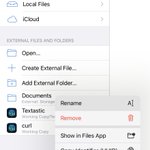
In Textastic 9.8.6 you can now rename external folders from the context menu. You can also use "Show in Files App" to quickly open the folder in the Files app.
1
4
16
"Show in Files App" is available for all folders, files and locations. This includes "Local Files" (which opens "On my <Device>/Textastic" and "iCloud" (which opens "iCloud Drive/Textastic").
1
2
Textastic 9.8.3 adds five new code editor themes: Yesterday (light), Tomorrow (dark), GitHub Light, GitHub Dark, and a personal favorite: Ocean (dark) The GitHub themes are based on GitHub's official VS Code themes.
2
15
Textastic 9.8.2 for iOS is now available. This is mainly a bug fix release, but also includes a few minor improvements.
2
1
17
As always, a detailed description of the changes can be found in the App Store.
5
I've added a detailed section to Textastic's manual on how to add custom fonts. I can recommend the free and open source iOS app FontCase, but you can also use Apple Configurator 2 on a Mac. textasticapp.com/v9/manual/c…
3
11
Textastic 9.8 with find in files support is now available on the App Store. I've also updated the manual with a detailed description and screenshots of the new feature: textasticapp.com/v9/manual/m…
1
9
22
The manual now also includes an updated description of all the settings in the latest version of Textastic: textasticapp.com/v9/manual/s… The two included Shortcuts actions are described at: textasticapp.com/v9/manual/i… I've also updated quite a few other topics and screenshots.
1
1
2
With Textastic 9.8 you will be able to search for text or regular expressions in multiple files at once. Find in files works in Local Files, iCloud and external folders (such as Git repositories in Working Copy). And it is fast! I hope to release it soon.
1
5
1
30
Textastic 9.7.1 is out! It hides the additional keys above the on-screen keyboard when an external keyboard is connected. This fixes some problems on iPadOS 15. For example, the "Replace All" button wasn't reachable anymore.
5
Textastic 9.7 is now available and improves the web preview web server: Instead of a random port, it now uses port 8080 by default and is started on app launch. This means, that you can now bookmark web preview URLs in Safari and they stay valid across app launches.
1
3
12
Many parts of the app have been rewritten to add better support for Dynamic Type and VoiceOver. This includes remote connection settings ((S)FTP, WebDAV, Google Drive, Dropbox), file properties, search settings, WebDAV server settings, and adding new files and folders.
1
2
I guess that not many of you use Textastic's WebDAV server anymore to transfer files from a Mac or PC. So I plan to move the button to start the WebDAV server from the bottom toolbar to a section in Textastic's settings. 📊Do you often use Textastic's built-in WebDAV server?
6%Yes
75%No
19%(See results)
68 votes • Final results
1
2
1
The problem is now fixed in Textastic 9.6.4. If you've been having trouble with Textastic's SSH terminal lately, please try again with this version.
Unfortunately there is a problem with non-ASCII characters in Textastic's SSH terminal on iOS 14.5 and later due to a change in WebKit. This will be fixed in the next update. Sorry for that.
1
2
5
Unfortunately there is a problem with non-ASCII characters in Textastic's SSH terminal on iOS 14.5 and later due to a change in WebKit. This will be fixed in the next update. Sorry for that.
1
5
Textastic 9.6 for iOS is now available: - Invisible characters: added new settings to show spaces and newlines in addition to tabs. - Go to line: You can now use Cmd-L to jump to a specific line in the current file.
3
4
1
23
Textastic 5.0 for macOS adds full support for macOS Big Sur with a refreshed user interface and an updated app icon. This release is a macOS Universal app, which can run natively on both Apple Silicon Macs and Intel-based Macs. apps.apple.com/us/app/textas…
1
5
1
32
Textastic 9.5 for iOS is now available: - supports the new iPhones - adds initial support for Shortcuts - you can now use the “Edit in Textastic” command in @WorkingCopyApp and the “textastic” terminal command in @ShellFishApp to easily open a file in Textastic
5
9
2
49